

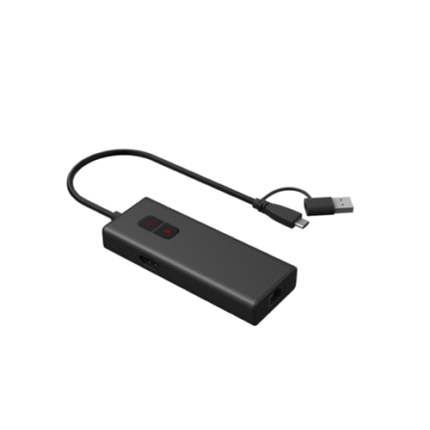
BYOD-2 Wired BYOM Pod
Product Overview
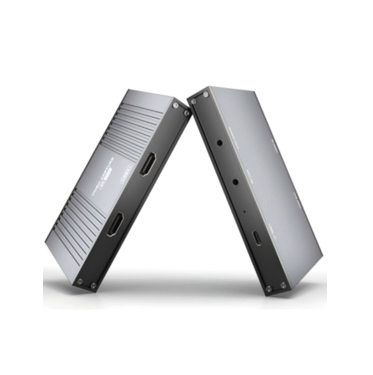
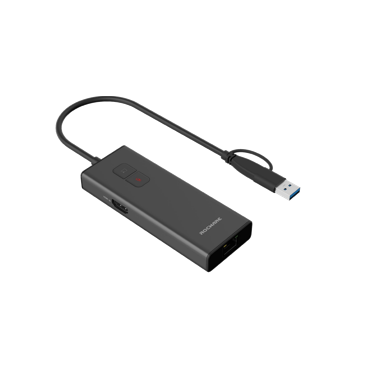
BYOD-2 is a professional wired BYOM (Bring Your Own Meeting) pod designed for video conferencing scenarios. It works seamlessly with cameras, videobars and video conferencing terminals, enabling wired screen sharing and BYOM applications. With plug-and-play functionality (no software installation required), it supports hardware encoding/decoding, 4K ultra-high-definition screen sharing and 1080P BYOM resolution. Equipped with USB-C, HDMI and 1000BaseT interfaces, it supports PoE/USB dual power supply and PD reverse power supply (up to 60W for PCs), providing a stable, efficient and flexible audio-visual transmission solution for various meeting environments.
Core Product Features
- Plug & Play & Easy Operation: No software installation needed; one-touch sharing and mute buttons for quick control, with dual-color status indicators for clear working status display
- High-Definition Audio-Video Transmission: Hardware encoding/decoding support; screen sharing up to 4K@30fps (H.265/H.264 encoding); BYOM application up to 1080P@30fps
- Rich Interface Compatibility: 1×USB-C (DP IN, audio-video transmission, control signaling, PD reverse power supply), 1×HDMI 2.0 IN (4K@30fps video input), 1×RJ45 (10M/100M/1000Mbps adaptive, PoE power supply)
- Dual Power Supply Modes: Supports PoE (IEEE802.3af) and USB power supply; optional PD adapter for reverse power supply to PCs (max 60W)
- Long-Distance Transmission: 1000BaseT interface enables long-distance transmission of audio, video and control signals when connected to the host
- Wide System & Software Compatibility: Supports Windows 7/8.1/10/11 and Mac OS X 10.10+ systems; compatible with Microsoft Teams, Zoom, Google Meet, Tencent Meeting, DingTalk, Feishu and other mainstream video conferencing software
Technical Specifications
Audio & Video Parameters
| Parameter | Specification |
|---|---|
| USB-C Video Resolution | 3840×2160, 2560×1600, 1920×1200, 1920×1080, 1366×768, 1280×800, 1280×720, 1024×768 |
| Screen Sharing Resolution/Frame Rate | Up to 3840×2160@30fps |
| Screen Sharing Video Encoding | H.265/H.264 |
| Screen Sharing Audio Encoding | 32KHz/16bit PCM, Mono/Stereo |
| Return Video Resolution/Frame Rate | Up to 1920×1080@30fps |
| Return Video Encoding | MJPEG |
| Return Audio Encoding | 32KHz/16bit PCM, Mono/Stereo |
| HDMI IN Specification | HDMI 2.0, supports 4K@30fps video input |
Interface & Power Parameters
| Category | Parameter | Specification |
|---|---|---|
| Interface | USB-C | 1×USB 2.0 Type-C (0.3m, male), supports DP IN, audio-video output, control signaling, PD reverse power supply (max 65W with external adapter) |
| POWER | 1×USB 2.0 Type-C (female), supports USB PD protocol, input up to 20V/3.25A | |
| LAN | 1×RJ45, 10M/100M/1000Mbps adaptive, supports PoE (for device operation only) | |
| HDMI IN | 1×HDMI 2.0 (female), 4K@30fps video input | |
| Power Supply | Input Voltage | USB 5V / PoE (IEEE802.3af) |
| Input Current | 0.6A | |
| Max Power Consumption | 3.0W | |
| PD Reverse Power Supply | Max 60W (requires 65W PD adapter) |
General Specifications
| Parameter | Specification |
|---|---|
| Operating System Compatibility | Windows 7/8.1/10/11 (32/64-bit); Mac OS X 10.10/10.11/10.12/10.13 or later |
| Supported Video Conferencing Software | Microsoft Teams, Zoom, Google Meet, Tencent Meeting, DingTalk, Feishu, etc. |
| Dimensions (W×H×D) | 120mm × 18mm × 45mm (Excluding wire length) |
| Net Weight | About 0.15kg |
| Operating Temperature | 0°C ~ +40°C |
| Storage Temperature | -40°C ~ +60°C |
| Operating/Storage Humidity | 0 ~ 90% RH (non-condensing) |
| USB Control Protocol | UVC/UAC |
Indicator Status Definition
| Button | Indicator Status | Description |
|---|---|---|
| Sharing Button | Solid Purple | Powering up |
| Blue Flashing | Pairing with host | |
| Solid Red | Pairing successful and input source detected | |
| Solid Blue | Screen sharing in progress | |
| Purple Flashing | No input source detected after pairing, or DP & HDMI detection failed | |
| Mute Button | Solid Purple | Powering up |
| Solid Blue | Non-mute mode, normal audio pickup | |
| Solid Red | Mute mode, local audio muted |
Basic Operation Guide
Connection Methods
- Connect to Host: Connect LAN port of the pod to EXT port of the host via network cable; or cascade with microphone (UP port to host EXT port, DOWN port to pod LAN port)
- Connect to PC: 1. USB-C (DP Alt Mode) port: Directly connect with pod’s USB-C (DP-IN) cable for audio-video-transmission; 2. USB-C (non-DP) / USB-A port: Connect with corresponding cable, and link PC’s HDMI OUT to pod’s HDMI IN for video input
Screen & Audio Sharing
- After successful pairing (sharing button solid red), press sharing button to start screen sharing (indicator turns solid blue); press again to stop
- All system audio of the PC is transmitted during sharing; press mute button to mute local audio (indicator turns solid red)
Package Contents
| Item Name | Quantity | Remarks |
|---|---|---|
| Wired BYOM Pod (BYOD-2) | 1 | Main device |
| PD Adapter | 1 | Optional, for PD reverse power supply |
| Quick Start Guide | 1 | Operation instructions |
Important Precautions: 1. Use certified PD adapters (CCC/UL/CE/FCC) to avoid counterfeit products; 2. Ensure ventilation for PD adapter during high-power charging, keep away from flammable materials; 3. Hold plugs when plugging/unplugging cables to avoid cable damage; 4. Keep the product and adapter dry to prevent short circuits; 5. Regularly inspect cables and adapters for damage, replace immediately if abnormalities are found; 6. Stop using immediately if the adapter overheats, emits odors or makes unusual noises.
Applicable Scenarios
- Corporate Conference Rooms: Medium/large conference rooms, team meetings, seamless connection with video conferencing terminals for wired screen sharing
- Remote Collaboration: Home offices, remote workstations, stable audio-visual transmission for online meetings
- Educational Institutions: Classrooms, training rooms, connecting PCs to teaching terminals for courseware sharing and interactive teaching
- Commercial Displays: Exhibition halls, product demonstration areas, high-definition screen sharing for product introductions
- Government & Enterprise: Official meetings, multi-department collaboration, secure and efficient BYOM applications
Note: All relevant information such as pictures, parameters and data provided on the website are for reference only. Please refer to the actual product received for specific specifications, appearance and performance.
Please contact our sales team for the latest details.
Please contact our sales team for the latest details.